Sunday, June 12

Colouring The Orchids


Today I want to share a colouring tutorial with you using the Orchid digital stamps, smooth cardstock and alcohol markers. I've chosen to go with yellow orchids, but you can use any colour you wish as the principals of colouring are the same.


1. I began by printing the orchid stem in a very light shade of grey, giving me a no-line look to the finished piece. You can alter the colour of the digital stamp in Microsoft Word or your favourite image editing software. If you prefer, you can print the image with the black outlines instead.


2. I like to start with the stem, or whatever is in the background, but this is just a personal preference. Add in the darkest of the greens (YG67) keeping the colour to the bottom of the stem and close to the flowers. The darker areas will recede, giving the illusion of shape and "pushing" the stem back behind the flowers.


3. Start to blend the mid colour (YG17) into the darkest green by overlapping the shades. Don't try to blend the colours completely as you want to keep some of the sudden variation and change in shade. Blend the next colour into the first two for the highlights (YG13). If you wish, you can come back in with the first green to darken the shadow areas.


4. Time to work on the little buds. I added a nice bright green (YG13) to the very tip of the bud, then blended in a lighter green (YG11) working from the tip, over the bright green and toward the base.
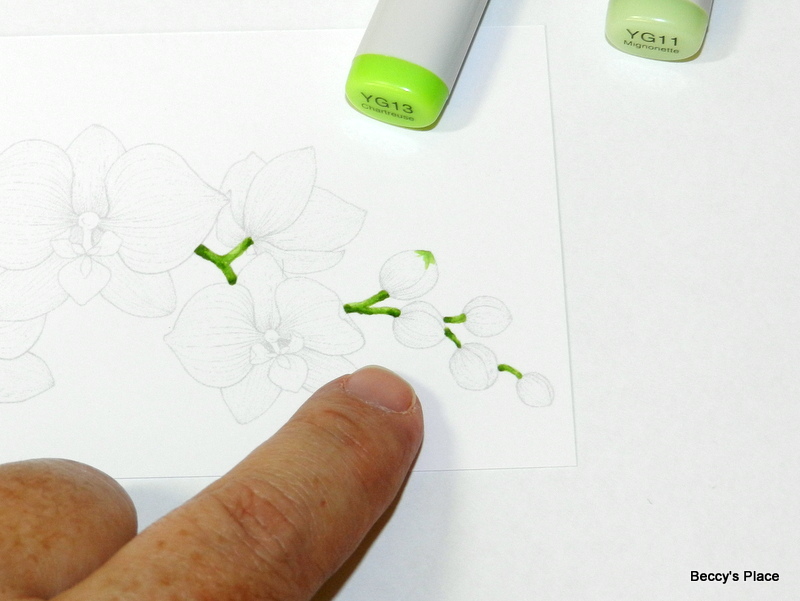

5. Now I'm adding a mid yellow (Y15) to the base of the bud, which will be the darkest area, and then adding two lighter shades (Y13 and Y11) as I work my way toward the green tip. The lightest yellow will come right up to the lightest green with a slight overlap. I'll use a blender pen (0) to blend the yellow and green. Alternatively, you could use either of the lighter makers to blend the colours together.


6. The flowers have several very small parts, as you can see from the photo below. The tiny tri-petal structure in the centre of the flower is really too small to do a lot of blending, so I'm only using two deep yellows (Y35 and Y38), concentrating the darkest colour closer to the base of each little petal.


7. The larger structure, also made up of three petals, is coloured with four shades of red, starting with the deepest shade (R39) that's laid around the base of the petals. Remember that the darker colours recede, giving the illusion of depth. I've used the remaining reds (R29, R27, R24) to colour the area, blending between each layer.


8. The structure that holds the red and yellow area of the flower is coloured with the two greens we used on the tips of the buds (YG13 and YG11). You want to bring the lighter green through to the base of the two large, side petals, which will be blended with the lightest yellow (Y11).


9. Time to blend all those yellows again, starting with the lightest yellow at the very base of the petal, over the green, and working out to the mid yellow (Y13 and Y15).


10. Add the two greens (YG13 and YG11) to the tip of each petal in the same way you did the buds. This will help break up all the yellow, distinguish each petal and also add interest to the coloured image. Once the tips are coloured, blend in the lightest yellow (Y11) and work back through the other yellows until you hit the mid colour again (Y13 and Y15). 


11. Add a layer of the lightest yellow (Y11) over the entire petal to help blend. Don't overwork the image though, you want to retain some of the texture from the pen strokes.


12. The remaining three petals are set further back on the flower, which means you want them to be darker. Use your darkest yellow (Y17) at the base of the petals and work through to the mid yellow again (Y18, Y15 NOTE: Y18 is actually a less intense colour than Y17)


13. Add the green tips, then complete the petals in the same way as the previous two, remembering to blend with the lightest yellow (Y11) once all the other colours have been added.


14. Adding a little shading will help distinguish the petals and layers of the flower. Take care to apply the pencil VERY lightly over the yellow. You can always add more layers of colour but it's very difficult to remove. I used a nice warm grey pencil (50% French Grey), followed by a slightly darker pencil right in close to the base (70% French Grey). If you're using cool colours for your flower, such as blue or purple, then choose a cool toned grey for the shadows.


15. Time to colour the remaining flowers.


16. And finish with some shading.


Stamps:

Friday, June 10

Retirement Days


Karin has used one of the images from the new Beach Bums set of stamps to create this fun card. I'm sure this lady has big plans to spend her hot summer days relaxing in the back yard next to her inflatable pool. If she's lucky, the grandkids may join her in the sandpit for a little castle building before they enjoy a cool lemonade in the shade of a lovely old tree.


Wednesday, June 8

Everything Papercraft - Gatefold Cards


Gate fold cards are simple to make and are a fast way to add dimension and movement to handmade cards. Gatefolds are basically cards that have two folds with a centre opening, although there are many design options you can add to change the size and shape of the finished product. While there are no hard and fast rules for making gatefold cards, it is important to carefully and accurately measure, score and fold for a good end result. You only need a piece of cardstock, a folding tool and your imagination to create unique handmade cards suitable for any occasion.

Here are some tutorials for different gatefold cards:

Monday, June 6

Enjoy Your Day


Deanne has created a beautiful, multi-purpose card using the new Orchid set of digital stamps. The dark background paper is a wonderful contrast for the flowers, while the little rhinestones add a touch of sparkle and shine.


Saturday, June 4

Sunset At The Beach

There's something extra special about watching the sun set over the ocean - the beautiful colours, the balmy breezes and the smell of salt in the air. I created my evening sky by blending distress inks onto a piece of smooth cardstock, masking the horizon between the sea and the sky. The images are from two different digital stamp sets - Beach Bums and Tree Scapes. Both have been fussy cut and mounted over the inked background.


Stamps:
 

Thursday, June 2

Cynthia Olheiser


Please join us in welcoming the lovely Cynthia Olheiser to the Beccy's Place creative team. Cynthia lives in Alaska with her husband and much loved chocolate Labrador, Bud. One of her favourite pastimes is creating beautiful cards for family and friends, which she loves to share on Facebook and her personal blog. We're thrilled to have her with us and look forward to sharing her creations later in the month!

May Winners

Congratulations to the May Challenge Winners!
Pam, Sarah and Gail
You are the randomly chosen winners of last month's challenge.
If you already have a Beccy's Place store account, I'll be adding a $20.00AU credit very soon.
If not, please email me at beccy@beccysplace.com to claim your prize.

Wednesday, June 1

New Releases


New digital stamps for June

Orchid
digital stamps


Beach Bums
digital stamps

June Challenge

Create a card or paper-craft project using any Beccy's Place image, upload a photo of it to your blog or other hosted site, and submit a direct link below. The challenge runs from now until midnight on the 30th of June 2022 (AEST).


DIGITAL PAPER

To keep things interesting, I'll be adding an additional optional element to the monthly challenges. This month it's a CASE (Copy And Selectively Edit) yourself challenge. Find a card that you really enjoyed making, or perhaps one that didn't turn out quite as you would have liked, and recreate it with a few tweaks. As always, keep in mind that the additional challenge is just an optional extra.

PLEASE READ THE CONDITIONS CAREFULLY
BEFORE ENTERING THE CHALLENGE
  • Entries that don't meet the conditions will be deleted from the challenge.
  • Your project must be created during the month of June 2022 and entered into the challenge during the active challenge period. Due to an automated system, late entries cannot be accepted.
  • Each month I will include a re-mastered digital image from my library of freebies as well as a bonus challenge, such as a card sketch, bingo grid, etc. You DO NOT have to use the image or bonus challenge on your project, but you MUST use a Beccy's Place image, either free or purchased, to be eligible for entry.
  • You can enter as many times as you like and you can submit your card to any other challenge you wish.
  • At the end of the month three different random winners will be chosen to receive a $20.00AU store credit for any digital stamps at Beccy's Place. To redeem the store credit, winners must have a Beccy's Place customer account. (Please note, you do not need an account to enter the challenge. It is acceptable to create an account in the event that you win. Accounts can be closed at any time.)
  • Store credit won during any Beccy's Place challenge is only redeemable for digital stamps. Entries can be uploaded to the challenge from any hosted site including blogs, online galleries, Google photos, etc.
  • If you do not have access to a hosted site, please feel free to email your photos to me and I will add them from the Beccy's Place Guest blog.
  • Beccy's Place designers may enter the monthly challenge but are not eligible to win prizes.